Purpose
Demo ZCL_XTT_DEMO_090 generates both dimensions of an XLSX table: a variable number of columns and a variable number of data rows. The order matters - merge the column descriptions first, then merge the main data.
Template
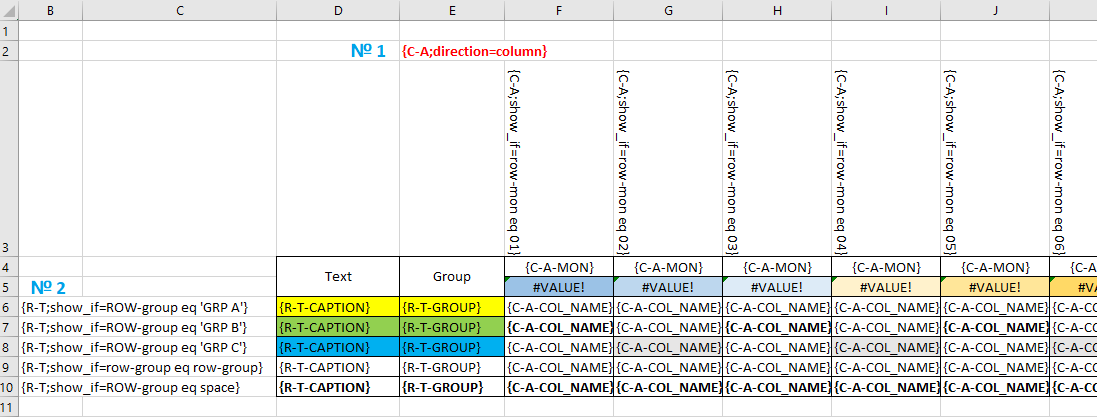
Data contract
    " Document structure
    BEGIN OF ts_merge0,
      a TYPE REF TO data, " Tree 1 In template {C-A}
    END OF ts_merge0,

    BEGIN OF ts_merge1,
      t TYPE REF TO data, " Tree 2 In template {R-T}
    END OF ts_merge1.
Merge sequence
Insert the columns as a table or tree under root C, then insert the row data under root R:
    " Columns
    ro_xtt->merge( is_block = ls_merge0 iv_block_name = 'C' ).

    " Rows
    ro_xtt->merge( ls_merge1 ).
Design notes
Only one prototype column is required in the template. Its formatting, formulas, and conditional formatting are copied for every generated column. The example also uses show_if to select column layouts conditionally.
For a fixed row type with nested amount tables, see demo 092. To repeat the entire structure across worksheets, see demo 091.