Purpose
Demo ZCL_XTT_DEMO_010 is the smallest complete XTT report. It passes one ABAP structure to a template and produces XLSX, HTML, DOCX, or PDF output. Start here if you are new to the library.
Define the report context
For a simple report, define a structure whose components mirror the markers in the template. Object attributes can be used in the same way.
    " Document structure
    BEGIN OF ts_root,
      title  TYPE char15,
      text   TYPE string,
      int    TYPE i,
      bottom TYPE string, " Any field could be REF TO, STRUCTURE or TABLE
    END OF ts_root.
Populate the structure before merging it:
    ls_root-title   = 'Document title'.
    ls_root-text    = 'Just string'.
    ls_root-int     = 3.
    ls_root-bottom  = 'bottom'.
Create the template
The corresponding Excel, Word, or PDF template can contain these markers:
Basic example
Title: {R-TITLE}
Just put markers where you want
Just string {R-TEXT}
Integer {R-INT}
Bottom: {R-BOTTOM}
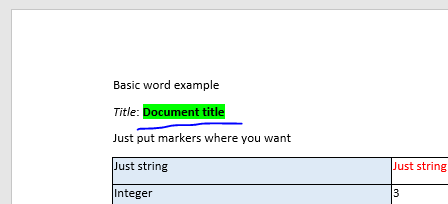
After the merge, the markers are replaced while their surrounding formatting is retained:
Basic example
Title: Document title
Just put markers where you want
Just string Just string
Integer 3
Bottom: bottom
***
Generate the report
The complete generation chain can be as short as one statement:
NEW zcl_xtt_excel_xlsx( NEW zcl_xtt_file_smw0( ) )->merge( ls_root )->download( ).
The library supports ABAP 7.02; the documentation uses newer syntax where it makes the example easier to read.
- Replace
ZCL_XTT_EXCEL_XLSXwith the requiredZCL_XTTdescendant for another output format.

- Replace
ZCL_XTT_FILE_SMW0with another template source when the template is not stored in SMW0.

-
Call
MERGE( )more than once when a template has several roots. The default root marker isR. -
Use the optional parameters of
DOWNLOAD( ), or choose another output method such asSHOW( )orSEND( ).

Word template caution
Formatting applied to a marker is retained in the generated document. In Word, however, one marker can be split into several XML text runs even when it looks continuous on screen.
Run Word’s spelling check with F7 before saving a template. Characters such as {, }, ;, and = may trigger proofing and cause Word to split the marker.

Current versions of ZCL_XTT_WORD_DOCX and ZCL_XTT_WORD_XML handle split runs by applying the style of the first run:
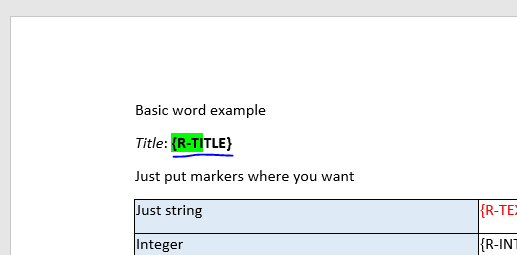
The resulting replacement therefore uses the style of the marker’s first part: