Type Template Report
Excel Download template Download report
Generate this example Choose a template and create a fresh report with the demo service.

xtt->merge( iv_block_name = 'R' is_block =

JSON
{"TITLE":"Title","T":[{"GROUP":"GRP A","CAPTION":"<Caption 1 />","DATE":"2020-10-21","SUM1":5971.44,"SUM2":5021.46},{"GROUP":"GRP C","CAPTION":"<Caption 2 />","DATE":"2020-10-19","SUM1":2276.75,"SUM2":7717.2},{"GROUP":"GRP B","CAPTION":"<Caption 3 />","DATE":"2020-10-20","SUM1":3031.38,"SUM2":445.22},{"GROUP":"GRP A","CAPTION":"<Caption 4 />","DATE":"2020-10-21","SUM1":9476.79,"SUM2":3683.27},{"GROUP":"GRP A","CAPTION":"<Caption 5 />","DATE":"2020-10-21","SUM1":4604.0,"SUM2":5525.85},{"GROUP":"GRP C","CAPTION":"<Caption 6 />","DATE":"2020-10-19","SUM1":2159.71,"SUM2":2260.94},{"GROUP":"GRP B","CAPTION":"<Caption 7 />","DATE":"2020-10-20","SUM1":2490.3,"SUM2":6388.81},{"GROUP":"GRP A","CAPTION":"<Caption 8 />","DATE":"2020-10-21","SUM1":5476.81,"SUM2":406.18},{"GROUP":"GRP D","CAPTION":"<Caption 9 />","DATE":"2020-10-18","SUM1":689.66,"SUM2":518.6},{"GROUP":"GRP C","CAPTION":"<Caption 10 />","DATE":"2020-10-19","SUM1":5451.87,"SUM2":4061.85},{"GROUP":"GRP D","CAPTION":"<Caption 11 />","DATE":"2020-10-18","SUM1":4573.55,"SUM2":5436.0},{"GROUP":"GRP C","CAPTION":"<Caption 12 />","DATE":"2020-10-19","SUM1":1196.35,"SUM2":522.46},{"GROUP":"GRP C","CAPTION":"<Caption 13 />","DATE":"2020-10-19","SUM1":7686.95,"SUM2":2727.98},{"GROUP":"GRP D","CAPTION":"<Caption 14 />","DATE":"2020-10-18","SUM1":978.18,"SUM2":295.55},{"GROUP":"GRP D","CAPTION":"<Caption 15 />","DATE":"2020-10-18","SUM1":71.12,"SUM2":8878.56}]}

).


Generate demo 052

Aggregation functions

Request preview

Purpose

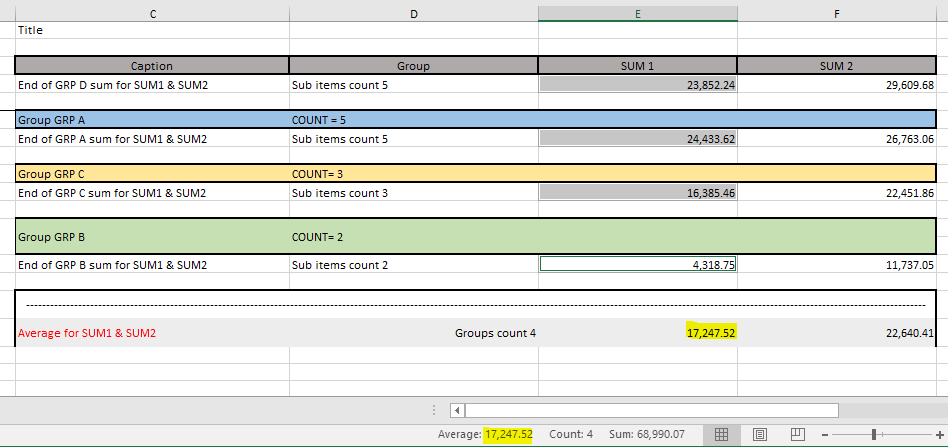
Demo ZCL_XTT_DEMO_052 calculates parent values from child rows. XTT supports both an ABAP event for custom logic and declarative aggregation functions for common totals.

Calculation in ABAP

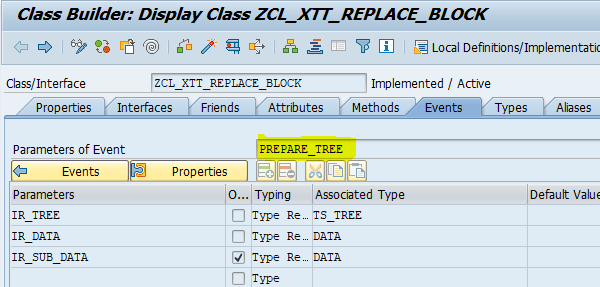
Use the PREPARE_TREE event when the parent calculation is application-specific:
After casting the generic references, loop over the children and calculate the required values.
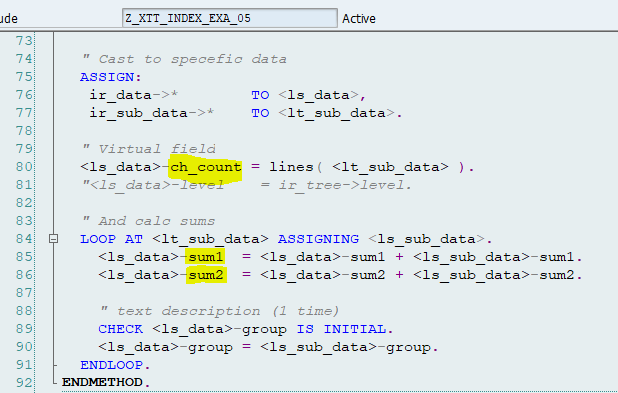
The handler is flexible, but its rules are not visible in the template.

Declarative aggregation

For standard calculations, use ;func= with SUM, AVG, COUNT, or FIRST.
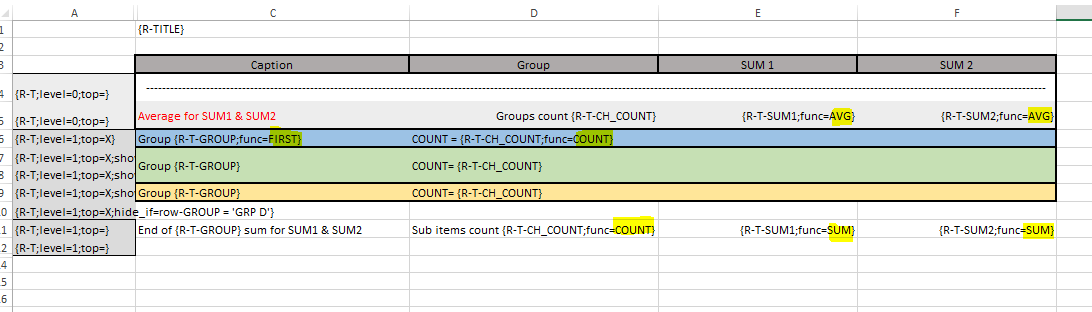
The function may be declared once for a complete level; it does not need to be repeated in every marker.

In the example, level 0 uses AVG, while level 1 uses SUM.

  • FIRST takes the value from the first child
  • COUNT returns their number


You can combine programmatic and declarative calculations. Prefer template functions when they express the rule clearly; use the event when they do not.